Docs
Doc / Compare / Express VPN vs. OmniEdge
ExpressVPN vs. OmniEdge
ExpressVPN and OmniEdge are fundamentally different products that solve different problems. Understanding these differences will help you choose the right solution for your needs.
At a Glance
| Aspect | ExpressVPN | OmniEdge |
|---|---|---|
| Purpose | Hide IP, bypass geo-restrictions | Connect your devices in a private mesh |
| Architecture | Client → Central Server | Peer-to-peer mesh |
| Use case | Consumer privacy | DevOps, IoT, remote access |
| Network | Shared public servers | Private virtual network |
| Who can access | Anyone with subscription | Only your authenticated devices |
What is ExpressVPN?
ExpressVPN is a consumer VPN service designed to:
- Hide your IP address from websites
- Bypass geo-restrictions (streaming, content access)
- Encrypt traffic on public Wi-Fi
- Provide anonymity online
How it works: Your traffic routes through ExpressVPN's servers. All users share the same server IP addresses. ExpressVPN doesn't let you connect to your own devices—it connects you to the internet through their servers.
What is OmniEdge?
OmniEdge is a peer-to-peer mesh VPN designed to:
- Connect your devices in a private network
- Access remote servers, IoT devices, and robots
- Enable secure team collaboration on shared resources
- Provide direct device-to-device connections
How it works: OmniEdge creates direct encrypted tunnels between your devices. Each device gets a private IP address (like 10.147.x.x) that only devices in your network can reach.
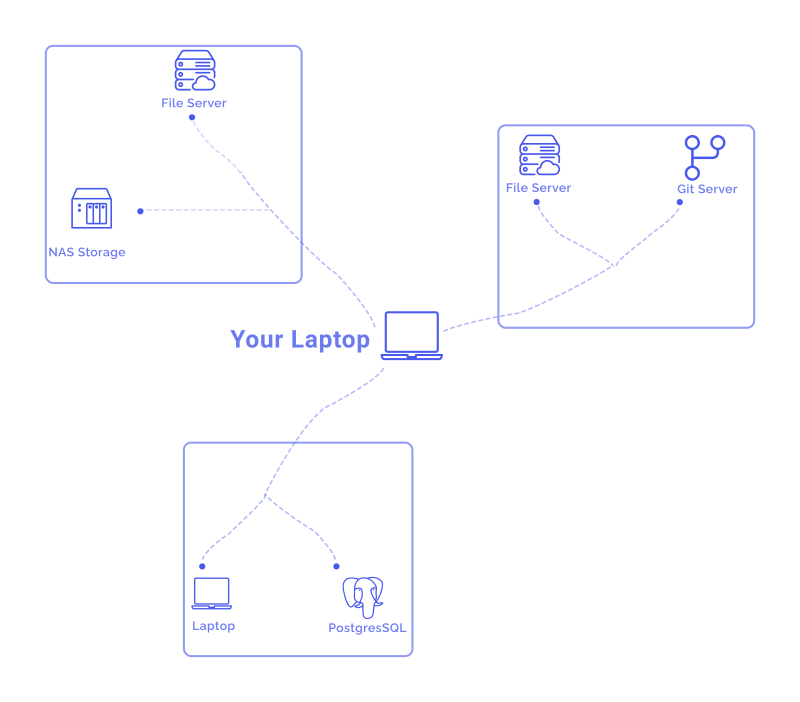 |
|---|
| OmniEdge - Your devices connect directly |
Key Differences
Network Architecture
| Aspect | ExpressVPN | OmniEdge |
|---|---|---|
| Topology | Hub-and-spoke (all traffic → server) | Peer-to-peer mesh |
| Your IP | Shared with other users | Private, unique per device |
| Latency | Higher (server relay) | Lower (direct P2P, +0.3ms overhead) |
| Bandwidth | Limited by server capacity | Direct connection speed |
Security and Privacy
| Feature | ExpressVPN | OmniEdge v2.x |
|---|---|---|
| Encryption | AES-256 (OpenVPN), ChaCha20 (Lightway) | ChaCha20-Poly1305 (WireGuard) |
| Key exchange | TLS | Noise protocol (Curve25519) |
| Forward secrecy | Yes | Yes |
| Who sees your traffic | ExpressVPN (trusted) | No one (direct P2P) |
| Zero-knowledge | Trust-based | By design (P2P) |
Access Control
| Aspect | ExpressVPN | OmniEdge |
|---|---|---|
| Who can connect | Any subscriber | Your authenticated devices only |
| Device verification | None (subscription-based) | Per-device authentication |
| Network isolation | Shared servers | Private virtual networks |
| Team management | Not available | Dashboard with ACLs |
Use Cases
| Use Case | ExpressVPN | OmniEdge |
|---|---|---|
| Watch Netflix from another country | Yes | No |
| Hide your IP from websites | Yes | No (not designed for this) |
| SSH to your home server | No | Yes |
| Access office resources remotely | No | Yes |
| Connect IoT devices securely | No | Yes |
| Robot fleet networking | No | Yes (purpose-built) |
| File sharing between your devices | No | Yes |
| Remote desktop to home PC | No | Yes |
OmniEdge v2.x Advantages
OmniEdge v2.x brings features that consumer VPNs don't offer:
Industrial-Grade Performance
Validated through 50-run longitudinal testing:
| Metric | OmniEdge | Notes |
|---|---|---|
| Latency overhead | +0.3ms | Minimal encryption cost |
| Latency stability (Cpk) | 2.92 (6-Sigma) | Industrial-grade |
| Throughput | 484.7 Mbps | Direct P2P |
Advanced NAT Traversal
omniedge config relay on        # Automatic relay for symmetric NAT
omniedge config portmap on      # UPnP/NAT-PMP support
Self-Hosted Option
Run your own signaling server for air-gapped environments:
sudo omniedge start --mode nucleus --port 51821 --secret "YourSecret"WASM Plugin System
Extend functionality with sandboxed plugins:
omniedge plugin install ./my-notification-plugin.wasm
omniedge plugin enable com.mycompany.notifications
Exit Node Support
Route traffic through a specific device (like a traditional VPN):
# Make this device an exit node
sudo omniedge start -x

# Use another device as exit node
sudo omniedge start -e 10.147.1.5
When to Use ExpressVPN
Choose ExpressVPN if you want to:
- Hide your IP address from websites
- Bypass geo-restrictions on streaming services
- Protect privacy on public Wi-Fi
- Access region-locked content
When to Use OmniEdge
Choose OmniEdge if you want to:
- Connect to your own devices remotely
- Build a private network for your team
- Access home/office resources from anywhere
- Connect IoT devices, robots, or edge devices
- Need low-latency, high-stability connections
- Run services that require direct device access (SSH, RDP, VNC)
Can You Use Both?
Yes! They serve different purposes:
- Use ExpressVPN when browsing the web and you want to hide your IP
- Use OmniEdge when you need to access your own devices or team resources
Summary
| I want to... | Use |
|---|---|
| Watch geo-blocked content | ExpressVPN |
| Hide my IP from websites | ExpressVPN |
| SSH to my home server | OmniEdge |
| Connect my robot fleet | OmniEdge |
| Share files with teammates | OmniEdge |
| Remote desktop to work PC | OmniEdge |
| Secure public Wi-Fi | Either (different approach) |
If you have more questions, feel free to discuss.
On This Page